
Whenever I reinstall my Windows laptop (Or a new management VM), I have a lot of apps, modules, RSAT Tools, Sysinternals tools, and settings that need to be installed or configured. So… Let’s automate that 🙂
Below are my installation scripts which you can use to install everything, or just the programs or the PowerShell modules. Options are there to do so and you can easily add/remove things in the JSON file and let it run again. Just put the three files in one location, run install_apps.cmd as Administrator and lean back…
Shortcuts for newly installed software will be removed from your desktop, hate those ;), and programs that start automatically after installation will be closed. Be aware of the fact that your machine might restart during installation. Save your work, and you can re-run the script to continue installing the rest (It will check and skip things that are already installed)
Install_Apps.cmd
@echo off
TITLE Installing Apps, Features and PowerShell Modules...
echo Your computer might restart, please save your work before continuing!
echo After restart, you can restart this script to finish installation
pause
powershell -executionpolicy bypass -noprofile -file "%~dp0install_apps.ps1" -All
echo Logging is available in %Temp%\Install.log
echo Press any to update installed apps or CTRL-C to exit and then reboot your system manually
pause
winget upgrade --all --silent --force
echo.
echo Done updating, press any key to quit and reboot your system manually
pause
Install_Apps.ps1
<#
.SYNOPSIS

Installs Programs, Modules, Features and settings using Winget and PowerShell

.DESCRIPTION

Installs/Configures all options from the .json file

.PARAMETER All
Install all Programs, Modules, Features and Settings

.PARAMETER Apps
Install all Software

.PARAMETER Features
Install all Windows Features

.PARAMETER MicrosftVCRuntime
Install all Microsoft VC++ Runtimes

.PARAMETER PowerShellCommands
Execute all PowerShell commands like Update-Help

.PARAMETER PowerShellModules
Install all PowerShell Modules

.PARAMETER PowerShellModulesUpdate
Update all installed PowerShell Modules to the latest version

.PARAMETER PowerShellProfile
Update the PowerShell Profile

.PARAMETER RSATTools
Install the Windows Remote System Administration Tools

.PARAMETER $SCCMTools
Install the System Center Configuration Manager tools like CMTrace

.PARAMETER SysInternalsSuite
Install the Windows Remote System Administration Tools

.PARAMETER IntuneWinAppUtil
Install the IntuneWinAppUtil in c:\windows\system32

.INPUTS

Defaults to -All if no other Parameters are specified

.OUTPUTS

Screen output and TransAction log which is available in %Temp%\Install.log

.EXAMPLE

PS> Install_Apps.ps1 -Apps
Installs all Applications

.EXAMPLE

PS> Install_Apps.ps1 -SCCMTools -PowerShellModule
Installs the System Center Configuration Manager Tools and installs all PowerShell Modules

.LINK

None

#>

#Parameters
[CmdletBinding(DefaultParameterSetName = "All")]
param (
    [Parameter(Mandatory = $False, HelpMessage = "Install all Software, Modules, Features and Settings", ParameterSetName = "All")][Switch]$All,
    [Parameter(Mandatory = $false, HelpMessage = "Install all Software", ParameterSetName = "Optional")][Switch]$Apps,
    [Parameter(Mandatory = $false, HelpMessage = "Install all Windows Features", ParameterSetName = "Optional")][Switch]$Features,
    [Parameter(Mandatory = $false, HelpMessage = "Install all Microsoft VC++ Runtimes", ParameterSetName = "Optional")][Switch]$MicrosftVCRuntime,
    [Parameter(Mandatory = $false, HelpMessage = "Execute all PowerShell commands like Update-Help", ParameterSetName = "Optional")][Switch]$PowerShellCommands,
    [Parameter(Mandatory = $false, HelpMessage = "Install all PowerShell Modules", ParameterSetName = "Optional")][Switch]$PowerShellModules,
    [Parameter(Mandatory = $false, HelpMessage = "Update all installed PowerShell Modules to the latest version", ParameterSetName = "Optional")][Switch]$PowerShellModulesUpdate,
    [Parameter(Mandatory = $false, HelpMessage = "Update the PowerShell Profile", ParameterSetName = "Optional")][Switch]$PowerShellProfile,
    [Parameter(Mandatory = $false, HelpMessage = "Install the Windows Remote System Administration Tools", ParameterSetName = "Optional")][Switch]$RSATTools,
    [Parameter(Mandatory = $false, HelpMessage = "Install the System Center Configuration Manager tools like CMTrace", ParameterSetName = "Optional")][Switch]$SCCMTools,
    [Parameter(Mandatory = $false, HelpMessage = "Install all SysInternals Suite tools and add them to the system path", ParameterSetName = "Optional")][Switch]$SysInternalsSuite,
    [Parameter(Mandatory = $false, HelpMessage = "Install the IntuneWinAppUtil to c:\windows\system32", ParameterSetName = "Optional")][Switch]$IntuneWinAppUtil
)
if ($PSCmdlet.ParameterSetName -eq 'All') {
    Write-Host ("No parameter was specified and using all options") -ForegroundColor Green
    $All = $True
}

#Requires -RunAsAdministrator
#Start Transcript logging in Temp folder
Start-Transcript $ENV:TEMP\install.log

#Set-Executionpolicy and no prompting
Set-ExecutionPolicy Bypass -Force:$True -Confirm:$false -ErrorAction SilentlyContinue
Set-Variable -Name 'ConfirmPreference' -Value 'None' -Scope Global

#Change invoke-webrequest progress bar to hidden for faster downloads
$ProgressPreference = 'SilentlyContinue'

#Import list of apps, features and modules that can be installed using json file
$json = Get-Content "$($PSScriptRoot)\Install_apps.json" | ConvertFrom-Json

#Check if Winget is installed, if not install it by installing VCLibs (Prerequisite) followed by Winget itself
if ($Apps -or $MicrosftVCRuntime -or $All) {
    if (!(Get-AppxPackage -Name Microsoft.Winget.Source)) {
        Write-Host ("Winget was not found and installing now") -ForegroundColor Yellow
        Invoke-Webrequest -uri https://aka.ms/Microsoft.VCLibs.x64.14.00.Desktop.appx -Outfile $ENV:TEMP\Microsoft.VCLibs.x64.14.00.Desktop.appx -UseBasicParsing
        Invoke-Webrequest -uri https://aka.ms/getwinget -Outfile $ENV:TEMP\winget.msixbundle -UseBasicParsing
        Add-AppxPackage $ENV:TEMP\Microsoft.VCLibs.x64.14.00.Desktop.appx -ErrorAction SilentlyContinue
        Add-AppxPackage -Path $ENV:TEMP\winget.msixbundle -ErrorAction SilentlyContinue
    }
}

if ($MicrosftVCRuntime -or $All) {
    #Install Microsoft Visual C++ Runtimes using WinGet
    Write-Host ("Installing Microsoft Visual C++ Runtime versions but skipping install if already present") -ForegroundColor Green
    $CurrentVC = Get-WmiObject -Class Win32_Product -Filter "Name LIKE '%Visual C++%'" -ErrorAction SilentlyContinue | Select-Object Name
    Foreach ($App in $json.MicrosftVCRuntime) {
        Write-Host ("Checking if {0} is already installed..." -f $App)
        if (!($CurrentVC | Select-String $App.split('+')[2].SubString(0, 4) | Select-String $App.split('-')[1])) {
            Write-Host ("{0} was not found and installing now" -f $App) -ForegroundColor Yellow
            winget.exe install $App --silent --force --source winget --accept-package-agreements --accept-source-agreements
        }
    }
}

if ($Apps -or $All) {
    #Install applications using WinGet
    Write-Host ("Installing Applications but skipping install if already present") -ForegroundColor Green
    Foreach ($App in $json.Apps) {
        Write-Host ("Checking if {0} is already installed..." -f $App)
        winget.exe list --id $App --accept-source-agreements | Out-Null
        if ($LASTEXITCODE -eq '-1978335212') {
            Write-Host ("{0} was not found and installing now" -f $App.Split('.')[1]) -ForegroundColor Yellow
            winget.exe install $App --silent --force --source winget --accept-package-agreements --accept-source-agreements
            Foreach ($Application in $json.ProcessesToKill) {
                get-process $Application -ErrorAction SilentlyContinue | Stop-Process -Force:$True -Confirm:$false
            }
        }
    }
    #Clean-up downloaded Winget Packages
    Remove-Item $ENV:TEMP\Winget -Recurse -Force:$True -ErrorAction:SilentlyContinue

    #Cleanup shortcuts from installed applications
    Foreach ($File in $json.filestoclean) {
        Write-Host ("Cleaning {0} from personal ad public Windows Desktop" -f $File) -ForegroundColor Green
        $UserDesktop = ([Environment]::GetFolderPath("Desktop"))
        Get-ChildItem C:\users\public\Desktop\$File -ErrorAction SilentlyContinue | Where-Object LastWriteDate -LE ((Get-Date).AddHours( - 1)) | Remove-Item -Force:$True
        Get-ChildItem $UserDesktop\$File -ErrorAction SilentlyContinue | Where-Object LastWriteDate -LE ((Get-Date).AddHours( - 1)) | Remove-Item -Force:$True
        Get-ChildItem C:\users\public\Desktop\$File -Hidden -ErrorAction SilentlyContinue | Where-Object LastWriteDate -LE ((Get-Date).AddHours( - 1)) | Remove-Item -Force:$True
        Get-ChildItem $UserDesktop\$File -Hidden -ErrorAction SilentlyContinue | Where-Object LastWriteDate -LE ((Get-Date).AddHours( - 1)) | Remove-Item -Force:$True
    }
}

if ($SCCMTools -or $All) {
    #Download and install System Center 2012 R2 Configuration Manager Toolkit for CMTRACE tool
    Write-Host ("Checking if System Center 2012 R2 Configuration Manager Toolkit is already installed") -ForegroundColor Green
    if (!(Test-Path 'C:\Program Files (x86)\ConfigMgr 2012 Toolkit R2')) {
        Write-Host ("SCCM 2012 R2 Toolkit was not found and installing now") -ForegroundColor Yellow
        Invoke-Webrequest -uri https://download.microsoft.com/download/5/0/8/508918E1-3627-4383-B7D8-AA07B3490D21/ConfigMgrTools.msi -UseBasicParsing -Outfile $ENV:TEMP\ConfigMgrTools.msi
        msiexec.exe /i $ENV:TEMP\ConfigMgrTools.msi /qn
    }
}

if ($SysInternalsSuite -or $All) {
    #Download and extract SysInternals Suite and add to system path
    Write-Host ("Checking if SysInternals Suite is present") -ForegroundColor Green
    if (!(Test-Path 'C:\Program Files (x86)\SysInterals Suite')) {
        Write-Host ("SysInternalsSuite was not found and installing now") -ForegroundColor Yellow
        Invoke-Webrequest -uri https://download.sysinternals.com/files/SysinternalsSuite.zip -Outfile $ENV:TEMP\SysInternalsSuite.zip -UseBasicParsing
        Expand-Archive -LiteralPath $ENV:TEMP\SysInternalsSuite.zip -DestinationPath 'C:\Program Files (x86)\SysInterals Suite'
        $OldPath = (Get-ItemProperty -Path 'Registry::HKEY_LOCAL_MACHINE\System\CurrentControlSet\Control\Session Manager\Environment' -Name PATH).Path
        $NewPath = $OldPath + ';C:\Program Files (x86)\SysInterals Suite\'
        Set-ItemProperty -Path 'Registry::HKEY_LOCAL_MACHINE\System\CurrentControlSet\Control\Session Manager\Environment' -Name PATH -Value $NewPath
    }
}

if ($IntuneWinAppUtil -or $All) {
    #Download IntuneWinAppUtil to c:\windows\system32
    Write-Host ("Checking if IntuneWinAppUtil Suite is present") -ForegroundColor Green
    if (!(Test-Path 'c:\windows\system32\IntuneWinAppUtil.exe')) {
        Write-Host ("IntuneWinAppUtil was not found and installing now") -ForegroundColor Yellow
        Invoke-Webrequest -uri https://github.com/microsoft/Microsoft-Win32-Content-Prep-Tool/raw/master/IntuneWinAppUtil.exe -Outfile c:\windows\system32\intunewinapputil.exe -UseBasicParsing
    }
}

if ($Features -or $All) {
    #Install Features
    Write-Host ("Installing Features but skipping install if already present") -ForegroundColor Green
    Foreach ($Feature in $json.Features) {
        Write-Host ("Checking if {0} is already installed..." -f $Feature)
        if ((Get-WindowsOptionalFeature -Online -FeatureName:$Feature).State -ne 'Enabled') {
            Write-Host ("{0} was not found and installing now" -f $Feature) -ForegroundColor Yellow
            Enable-WindowsOptionalFeature -Online -FeatureName:$Feature -NoRestart:$True -ErrorAction SilentlyContinue | Out-Null
        }
    }
}

if ($PowerShellModules -or $All) {
    #Install PowerShell Modules
    Write-Host ("Installing Modules but skipping install if already present") -ForegroundColor Green
    [Net.ServicePointManager]::SecurityProtocol = [Net.SecurityProtocolType]::Tls12

    Set-PSRepository PSGallery -InstallationPolicy Trusted

    Foreach ($Module in $json.PowerShellModules) {
        Write-Host ("Checking if the {0} is already installed..." -f $Module)
        if (!(Get-Module $Module -ListAvailable)) {
            Write-Host ("{0} PowerShell Module was not found and installing now" -f $Module) -ForegroundColor Yellow
            Install-Module -Name $Module -Scope AllUsers -Force:$True -AllowClobber:$True
        }
    }
}

if ($RSATTools -or $All) {
    #Install selected RSAT Tools
    Write-Host ("Installing RSAT components but skipping install if already present") -ForegroundColor Green
    Foreach ($Tool in $json.RSATTools) {
        Write-Host ("Checking if {0} is already installed..." -f $Tool.Split('~')[0])
        if ((Get-WindowsCapability -Online -Name:$Tool).State -ne 'Installed') {
            Write-Host ("{0} was not found and installing now" -f $Tool.Split('~')[0]) -ForegroundColor Yellow
            DISM.exe /Online /add-capability /CapabilityName:$Tool /NoRestart /Quiet | Out-Null
        }
    }
}

if ($PowerShellProfile -or $All) {
    #Add settings to PowerShell Profile (Creating Profile if not exist)
    Write-Host ("Adding settings to PowerShell Profile but skipping setting if already present") -ForegroundColor Green
    Foreach ($Setting in $json.PowerShellProfile) {
        Write-Host ("Checking if {0} is already added..." -f $Setting)
        if (!(Test-Path $profile)) {
            New-Item -Path $profile -ItemType:File -Force:$True | out-null
        }
        if (!(Get-Content $profile | Select-String -Pattern $Setting -SimpleMatch)) {
            Write-Host ("{0} was not found and adding now" -f $Setting) -ForegroundColor Yellow
            Add-Content $profile "`n$($Setting)"
        }
    }
}

if ($PowerShellModulesUpdate -or $All) {
    #Update PowerShell Modules if needed
    Write-Host ("Checking for older versions of PowerShell Modules and removing those if present") -ForegroundColor Green
    Set-PSRepository PSGallery -InstallationPolicy Trusted

    Foreach ($Module in Get-InstalledModule | Select-Object Name) {
        Write-Host ("Checking for older versions of the {0} PowerShell Module" -f $Module.Name)
        $AllVersions = Get-InstalledModule -Name $Module.Name -AllVersions -ErrorAction:SilentlyContinue
        $AllVersions = $AllVersions | Sort-Object PublishedDate -Descending
        $MostRecentVersion = $AllVersions[0].Version
        if ($AllVersions.Count -gt 1 ) {
            Foreach ($Version in $AllVersions) {
                if ($Version.Version -ne $MostRecentVersion) {
                    Write-Host ("Uninstalling previous version {0} of Module {1}" -f $Version.Version, $Module.Name) -ForegroundColor Yellow
                    Uninstall-Module -Name $Module.Name -RequiredVersion $Version.Version -Force:$True
                }
            }
        }
    }
}

if ($PowerShellCommands -or $All) {
    #Run PowerShell commandline options
    Write-Host ("Running Commandline options and this could take a while") -ForegroundColor Green
    Foreach ($Command in $json.PowerShellCommands) {
        Write-Host ("Running {0}" -f $Command) -ForegroundColor Yellow
        Powershell.exe -Executionpolicy Bypass -Command $Command
    }
}

#Stop Transcript logging
Stop-Transcript
Install_Apps.json
{
   "Apps": [
      "Microsoft.SQLServerManagementStudio",
      "7zip.7zip",
      "Adobe.Acrobat.Reader.64-bit",
      "AnyConnect",
      "BraveSoftware.BraveBrowser",
      "Canonical.Ubuntu",
      "Cisco.CiscoWebexMeetings",
      "Citrix.Workspace",
      "Famatech.AdvancedIPScanner",
      "Fortinet.FortiClientVPN",
      "Git.Git",
      "GitHub.GitHubDesktop",
      "Google.Chrome",
      "Graphviz.Graphviz",
      "Insecure.Nmap",
      "JAMSoftware.TreeSize.Free",
      "Microsoft.AzureCLI",
      "Microsoft.AzureStorageExplorer",
      "Microsoft.DeploymentToolkit",
      "Microsoft.dotnetRuntime.3.1",
      "Microsoft.dotnetRuntime.5",
      "Microsoft.EdgeWebView2Runtime",
      "Microsoft.PowerBI",
      "Microsoft.Powershell",
      "Microsoft.PowerToys",
      "Microsoft.RemoteDesktopClient",
      "Microsoft.VisualStudioCode",
      "Microsoft.WindowsAdminCenter",
      "Microsoft.WindowsADK",
      "Microsoft.WindowsTerminal",
      "Mozilla.FireFox",
      "Notepad++.Notepad++",
      "Obsidian.Obsidian",
      "Ookla.Speedtest",
      "OpenVPNTechnologies.OpenVPNConnect",
      "Oracle.JavaRuntimeEnvironment",
      "PuTTY.PuTTY",
      "Python.Python.3",
      "Rufus.Rufus",
      "Teamviewer.Teamviewer",
      "Telerik.Fiddler",
      "WinSCP.WinSCP",
      "WiresharkFoundation.Wireshark",
      "Zoom.Zoom"
   ],
   "Features": [
      "Containers-DisposableClientVM",
      "Microsoft-Windows-Subsystem-Linux",
      "TelnetClient",
      "TFTP"
   ],
   "FilesToClean": [
      "*.lnk",
      "desktop.ini"
   ],
   "MicrosftVCRuntime": [
      "Microsoft.VC++2008Redist-x86",
      "Microsoft.VC++2008Redist-x64",
      "Microsoft.VC++2010Redist-x64",
      "Microsoft.VC++2010Redist-x86",
      "Microsoft.VC++2012Redist-x64",
      "Microsoft.VC++2012Redist-x86",
      "Microsoft.VC++2013Redist-x64",
      "Microsoft.VC++2013Redist-x86"
   ],
   "ProcessesToKill": [
      "advanced_ip_scanner",
      "OpenVPNConnect",
      "PowerToys.Settings",
      "PtSrv",
      "PtSrv"
   ],
   "PowerShellCommands": [
      "Update-Help -Confirm:$False -Force:$True -ErrorAction:SilentlyContinue"
   ],
   "PowerShellModules": [
      "AIPService",
      "Az",
      "Azure.AnalysisServices",
      "Azure.Storage",
      "AzureAD",
      "AzureADPreview",
      "AzureRM",
      "AZViz",
      "CredentialManager",
      "ExchangeOnlineManagement",
      "IntuneBackupAndRestore",
      "IntuneDocumentation",
      "IntuneWin32App",
      "M365Documentation",
      "Microsoft.Graph",
      "Microsoft.Online.SharePoint.PowerShell",
      "Microsoft.PowerApps.Administration.Powershell",
      "Microsoft.PowerShell.Crescendo",
      "Microsoft.PowerShell.SecretManagement",
      "Microsoft.PowerShell.SecretStore",
      "Microsoft.RDInfra.RDPowershell",
      "MicrosoftTeams",
      "MSAL.PS",
      "MSCommerce",
      "MSGraph",
      "MSGraphFunctions",
      "MSOnline",
      "oh-my-posh",
      "ORCA",
      "PackageManagement",
      "PnP.PowerShell",
      "Posh-Git",
      "PowerShellGet",
      "Powershell-yaml",
      "ps2exe",
      "PSFramework",
      "PSGraph",
      "PSParseHTML",
      "PSReadLine",
      "PSSlack",
      "PSWindowsUpdate",
      "PSWord",
      "PSWriteWord",
      "SharePointPnPPowerShellOnline",
      "SQLServer",
      "Terminal-Icons",
      "VMware.CloudServices",
      "VMware.DeployAutomation",
      "VMware.ImageBuilder",
      "VMware.PowerCLI",
      "VMware.Sdk.Runtime",
      "VMware.Sdk.vSphere",
      "VMware.Vim",
      "VMware.VumAutomation",
      "WindowsAutoPilotIntune",
      "WindowsConsoleFonts"
   ],
   "PowerShellProfile": [
      "Import-Module Posh-Git",
      "Set-PSReadlineKeyHandler -Key Tab -Function Complete",
      "Set-PSReadLineOption -PredictionSource History",
      "[Net.ServicePointManager]::SecurityProtocol = [Net.SecurityProtocolType]::Tls12"
   ],
   "RSATTools": [
      "Rsat.ActiveDirectory.DS-LDS.Tools~~~~0.0.1.0",
      "Rsat.BitLocker.Recovery.Tools~~~~0.0.1.0",
      "Rsat.CertificateServices.Tools~~~~0.0.1.0",
      "Rsat.DHCP.Tools~~~~0.0.1.0",
      "Rsat.Dns.Tools~~~~0.0.1.0",
      "Rsat.FailoverCluster.Management.Tools~~~~0.0.1.0",
      "Rsat.FileServices.Tools~~~~0.0.1.0",
      "Rsat.GroupPolicy.Management.Tools~~~~0.0.1.0",
      "Rsat.IPAM.Client.Tools~~~~0.0.1.0",
      "Rsat.LLDP.Tools~~~~0.0.1.0",
      "Rsat.NetworkController.Tools~~~~0.0.1.0",
      "Rsat.NetworkLoadBalancing.Tools~~~~0.0.1.0",
      "Rsat.RemoteAccess.Management.Tools~~~~0.0.1.0",
      "Rsat.RemoteDesktop.Services.Tools~~~~0.0.1.0",
      "Rsat.ServerManager.Tools~~~~0.0.1.0",
      "Rsat.Shielded.VM.Tools~~~~0.0.1.0",
      "Rsat.StorageMigrationService.Management.Tools~~~~0.0.1.0",
      "Rsat.StorageReplica.Tools~~~~0.0.1.0",
      "Rsat.SystemInsights.Management.Tools~~~~0.0.1.0",
      "Rsat.VolumeActivation.Tools~~~~0.0.1.0",
      "Rsat.WSUS.Tools~~~~0.0.1.0"
   ]
}
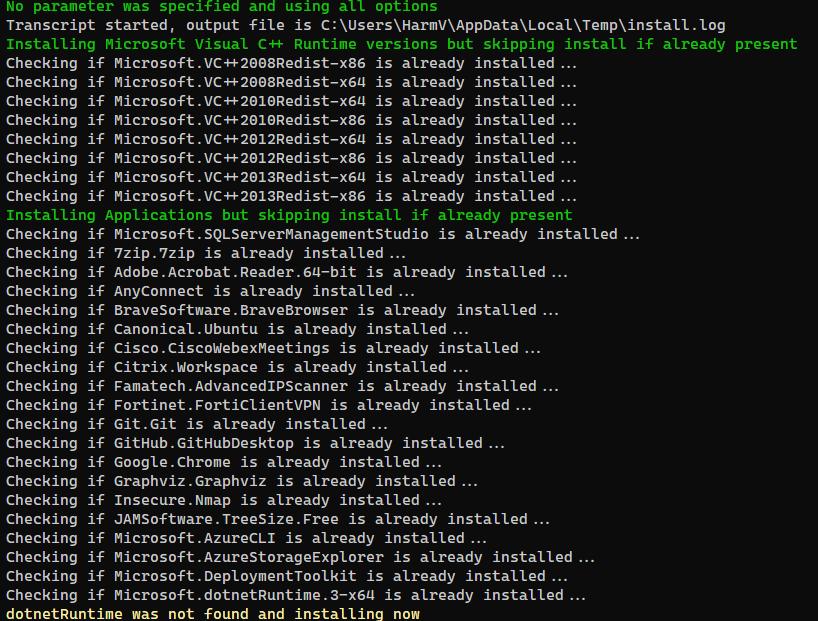
The output
When running the script, it will report progress like this:
Download the script(s) from GitHub here
0 thoughts on “It’s a lot of work reinstalling your system… But not with PowerShell and Winget!”