
I use Microsoft 365 Backup for my tenant; it’s a simple way to back up Exchange, OneDrive, and SharePoint data to an Azure Subscription. There was no PowerShell module to query and configure things, but that has changed because the Beta module was released three days ago. In this blog post, I will describe my first experience trying to use the new module.
What is Microsoft 365 Backup?
“
Overview of Microsoft 365 Backup
Microsoft 365 Backup is designed to ensure your organization’s data is always protected and easily recoverable. With the ability to back up all or select SharePoint sites, OneDrive accounts, and Exchange mailboxes, Microsoft 365 Backup provides comprehensive coverage for your critical data.
Scenarios and value proposition
Business continuity assurance is a top-of-mind concern for many companies. Microsoft 365 Backup delivers business continuity peace of mind by providing performance and reliable restore confidence. When evaluating a backup and restore offering, what really matters isn’t solely the backup, but the ability to restore your data to a healthy state quickly when you need to do so. Recovering large volumes of content is difficult when copying data at a scale from a remote, air-gapped location requiring weeks or even months to get your business back up and running.
In cases of a ransomware attack that encrypts large swaths of your data, or instances of an internal accidental or malicious data deletion or overwrite event, you need to be able to get your business back to a healthy state as soon as possible. This is what the Microsoft 365 Backup product offers, both through the Microsoft 365 admin center, and via partner applications built on the Microsoft 365 Backup Storage platform.”
Source: Overview of Microsoft 365 Backup | Microsoft Learn
The PowerShell Module
I didn’t know if there was a PowerShell module for it, but using Microsoft Graph X-Ray, I discovered the new Microsoft.Graph.Beta.BackupRestore beta module gave me data inside the Microsoft Admin Center / Settings / Microsoft 365 Backup pane:

The Microsoft.Graph.Beta.BackupRestore module
Installation
You can install the module by using Install-Module:
Install-Module -Name Microsoft.Graph.Beta.BackupRestore
Or by using Install-PSResource:
Install-PSResource -Name Microsoft.Graph.Beta.BackupRestore
If the required Microsoft.Graph.Authentication module was unavailable on your system; it will also install that. After installation, the following cmdlets are available:
Get-MgBetaSolutionBackupRestore
Get-MgBetaSolutionBackupRestoreDriveInclusionRule
Get-MgBetaSolutionBackupRestoreDriveInclusionRuleCount
Get-MgBetaSolutionBackupRestoreDriveProtectionUnit
Get-MgBetaSolutionBackupRestoreDriveProtectionUnitCount
Get-MgBetaSolutionBackupRestoreExchangeProtectionPolicy
Get-MgBetaSolutionBackupRestoreExchangeProtectionPolicyCount
Get-MgBetaSolutionBackupRestoreExchangeProtectionPolicyMailboxInclusionRule
Get-MgBetaSolutionBackupRestoreExchangeProtectionPolicyMailboxInclusionRuleCount
Get-MgBetaSolutionBackupRestoreExchangeProtectionPolicyMailboxProtectionUnit
Get-MgBetaSolutionBackupRestoreExchangeProtectionPolicyMailboxProtectionUnitCount
Get-MgBetaSolutionBackupRestoreExchangeRestoreSession
Get-MgBetaSolutionBackupRestoreExchangeRestoreSessionCount
Get-MgBetaSolutionBackupRestoreExchangeRestoreSessionMailboxRestoreArtifact
Get-MgBetaSolutionBackupRestoreExchangeRestoreSessionMailboxRestoreArtifactCount
Get-MgBetaSolutionBackupRestoreExchangeRestoreSessionMailboxRestoreArtifactRestorePoint
Get-MgBetaSolutionBackupRestoreMailboxInclusionRule
Get-MgBetaSolutionBackupRestoreMailboxInclusionRuleCount
Get-MgBetaSolutionBackupRestoreMailboxProtectionUnit
Get-MgBetaSolutionBackupRestoreMailboxProtectionUnitCount
Get-MgBetaSolutionBackupRestoreOneDriveForBusinessProtectionPolicy
Get-MgBetaSolutionBackupRestoreOneDriveForBusinessProtectionPolicyCount
Get-MgBetaSolutionBackupRestoreOneDriveForBusinessProtectionPolicyDriveInclusionRule
Get-MgBetaSolutionBackupRestoreOneDriveForBusinessProtectionPolicyDriveInclusionRuleCount
Get-MgBetaSolutionBackupRestoreOneDriveForBusinessProtectionPolicyDriveProtectionUnit
Get-MgBetaSolutionBackupRestoreOneDriveForBusinessProtectionPolicyDriveProtectionUnitCount
Get-MgBetaSolutionBackupRestoreOneDriveForBusinessRestoreSession
Get-MgBetaSolutionBackupRestoreOneDriveForBusinessRestoreSessionCount
Get-MgBetaSolutionBackupRestoreOneDriveForBusinessRestoreSessionDriveRestoreArtifact
Get-MgBetaSolutionBackupRestoreOneDriveForBusinessRestoreSessionDriveRestoreArtifactCount
Get-MgBetaSolutionBackupRestoreOneDriveForBusinessRestoreSessionDriveRestoreArtifactRestorePoint
Get-MgBetaSolutionBackupRestorePoint
Get-MgBetaSolutionBackupRestorePointCount
Get-MgBetaSolutionBackupRestorePointProtectionUnit
Get-MgBetaSolutionBackupRestoreProtectionPolicy
Get-MgBetaSolutionBackupRestoreProtectionPolicyCount
Get-MgBetaSolutionBackupRestoreProtectionUnit
Get-MgBetaSolutionBackupRestoreProtectionUnitCount
Get-MgBetaSolutionBackupRestoreServiceApp
Get-MgBetaSolutionBackupRestoreServiceAppCount
Get-MgBetaSolutionBackupRestoreSession
Get-MgBetaSolutionBackupRestoreSessionCount
Get-MgBetaSolutionBackupRestoreSharePointProtectionPolicy
Get-MgBetaSolutionBackupRestoreSharePointProtectionPolicyCount
Get-MgBetaSolutionBackupRestoreSharePointProtectionPolicySiteInclusionRule
Get-MgBetaSolutionBackupRestoreSharePointProtectionPolicySiteInclusionRuleCount
Get-MgBetaSolutionBackupRestoreSharePointProtectionPolicySiteProtectionUnit
Get-MgBetaSolutionBackupRestoreSharePointProtectionPolicySiteProtectionUnitCount
Get-MgBetaSolutionBackupRestoreSharePointRestoreSession
Get-MgBetaSolutionBackupRestoreSharePointRestoreSessionCount
Get-MgBetaSolutionBackupRestoreSharePointRestoreSessionSiteRestoreArtifact
Get-MgBetaSolutionBackupRestoreSharePointRestoreSessionSiteRestoreArtifactCount
Get-MgBetaSolutionBackupRestoreSharePointRestoreSessionSiteRestoreArtifactRestorePoint
Get-MgBetaSolutionBackupRestoreSiteInclusionRule
Get-MgBetaSolutionBackupRestoreSiteInclusionRuleCount
Get-MgBetaSolutionBackupRestoreSiteProtectionUnit
Get-MgBetaSolutionBackupRestoreSiteProtectionUnitCount
New-MgBetaSolutionBackupRestoreDriveInclusionRule
New-MgBetaSolutionBackupRestoreDriveProtectionUnit
New-MgBetaSolutionBackupRestoreExchangeProtectionPolicy
New-MgBetaSolutionBackupRestoreExchangeRestoreSession
New-MgBetaSolutionBackupRestoreExchangeRestoreSessionMailboxRestoreArtifact
New-MgBetaSolutionBackupRestoreMailboxInclusionRule
New-MgBetaSolutionBackupRestoreMailboxProtectionUnit
New-MgBetaSolutionBackupRestoreOneDriveForBusinessProtectionPolicy
New-MgBetaSolutionBackupRestoreOneDriveForBusinessRestoreSession
New-MgBetaSolutionBackupRestoreOneDriveForBusinessRestoreSessionDriveRestoreArtifact
New-MgBetaSolutionBackupRestorePoint
New-MgBetaSolutionBackupRestoreProtectionPolicy
New-MgBetaSolutionBackupRestoreServiceApp
New-MgBetaSolutionBackupRestoreSession
New-MgBetaSolutionBackupRestoreSharePointProtectionPolicy
New-MgBetaSolutionBackupRestoreSharePointRestoreSession
New-MgBetaSolutionBackupRestoreSharePointRestoreSessionSiteRestoreArtifact
New-MgBetaSolutionBackupRestoreSiteInclusionRule
New-MgBetaSolutionBackupRestoreSiteProtectionUnit
Remove-MgBetaSolutionBackupRestore
Remove-MgBetaSolutionBackupRestoreDriveInclusionRule
Remove-MgBetaSolutionBackupRestoreDriveProtectionUnit
Remove-MgBetaSolutionBackupRestoreExchangeProtectionPolicy
Remove-MgBetaSolutionBackupRestoreExchangeRestoreSession
Remove-MgBetaSolutionBackupRestoreExchangeRestoreSessionMailboxRestoreArtifact
Remove-MgBetaSolutionBackupRestoreMailboxInclusionRule
Remove-MgBetaSolutionBackupRestoreMailboxProtectionUnit
Remove-MgBetaSolutionBackupRestoreOneDriveForBusinessProtectionPolicy
Remove-MgBetaSolutionBackupRestoreOneDriveForBusinessRestoreSession
Remove-MgBetaSolutionBackupRestoreOneDriveForBusinessRestoreSessionDriveRestoreArtifact
Remove-MgBetaSolutionBackupRestorePoint
Remove-MgBetaSolutionBackupRestoreProtectionPolicy
Remove-MgBetaSolutionBackupRestoreServiceApp
Remove-MgBetaSolutionBackupRestoreSession
Remove-MgBetaSolutionBackupRestoreSharePointProtectionPolicy
Remove-MgBetaSolutionBackupRestoreSharePointRestoreSession
Remove-MgBetaSolutionBackupRestoreSharePointRestoreSessionSiteRestoreArtifact
Remove-MgBetaSolutionBackupRestoreSiteInclusionRule
Remove-MgBetaSolutionBackupRestoreSiteProtectionUnit
Update-MgBetaSolutionBackupRestore
Update-MgBetaSolutionBackupRestoreDriveInclusionRule
Update-MgBetaSolutionBackupRestoreDriveProtectionUnit
Update-MgBetaSolutionBackupRestoreExchangeProtectionPolicy
Update-MgBetaSolutionBackupRestoreExchangeRestoreSession
Update-MgBetaSolutionBackupRestoreExchangeRestoreSessionMailboxRestoreArtifact
Update-MgBetaSolutionBackupRestoreMailboxInclusionRule
Update-MgBetaSolutionBackupRestoreMailboxProtectionUnit
Update-MgBetaSolutionBackupRestoreOneDriveForBusinessProtectionPolicy
Update-MgBetaSolutionBackupRestoreOneDriveForBusinessRestoreSession
Update-MgBetaSolutionBackupRestoreOneDriveForBusinessRestoreSessionDriveRestoreArtifact
Update-MgBetaSolutionBackupRestorePoint
Update-MgBetaSolutionBackupRestoreProtectionPolicy
Update-MgBetaSolutionBackupRestoreServiceApp
Update-MgBetaSolutionBackupRestoreSession
Update-MgBetaSolutionBackupRestoreSharePointProtectionPolicy
Update-MgBetaSolutionBackupRestoreSharePointRestoreSession
Update-MgBetaSolutionBackupRestoreSharePointRestoreSessionSiteRestoreArtifact
Update-MgBetaSolutionBackupRestoreSiteInclusionRule
Update-MgBetaSolutionBackupRestoreSiteProtectionUnit
That’s a lot of cmdlets—116 in total! But, as you can see, they all have MgBetaSolutionBackupRestore in their names. I know it’s a Microsoft Graph Beta module, but even all cmdlet names have Beta, so be aware of that. This gave the first clue that it might be a bumpy ride.
Permissions
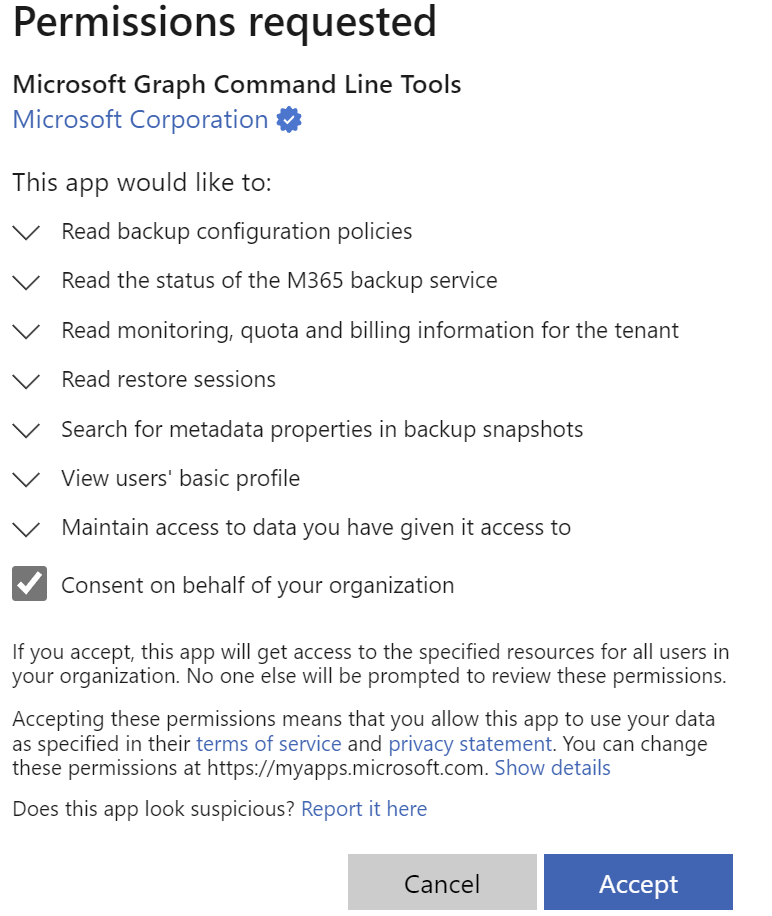
Before using the cmdlets, you must connect to Microsoft Graph by running and consenting to the required permissions. In the example below, I connect all the Scopes with Read.All. (Change it to ReadWrite.All if you need to change things)
Connect-MgGraph -Scopes BackupRestore-Configuration.Read.All, BackupRestore-Control.Read.All, BackupRestore-Monitor.Read.All, BackupRestore-Restore.Read.All, BackupRestore-Search.Read.All
After logging in, you will be prompted to consent to the permissions on behalf of your organization:
And then…
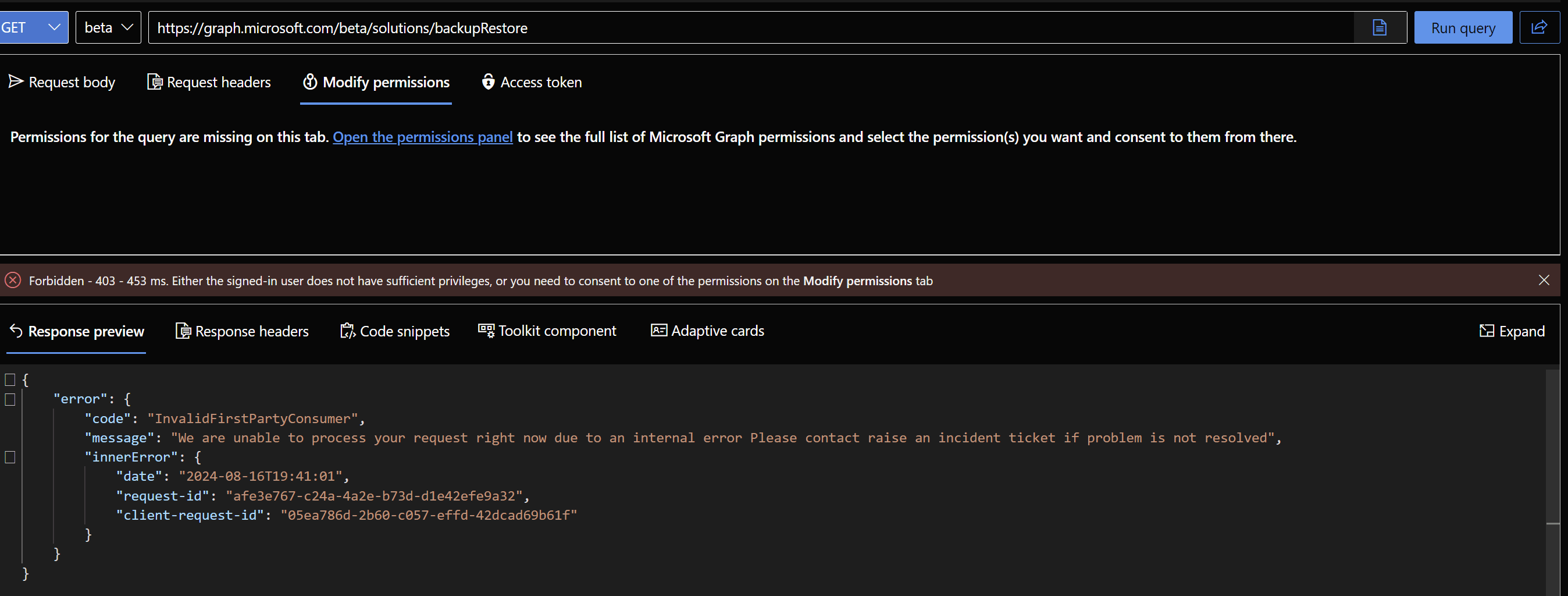
Things are just not working now (yet)?!?! 🙁 I couldn’t connect to my tenant using the cmdlets from Microsoft.Graph.Beta.BackupRestore module at all:

Checked the permissions again and tried Microsoft Graph Explorer, but the same thing:
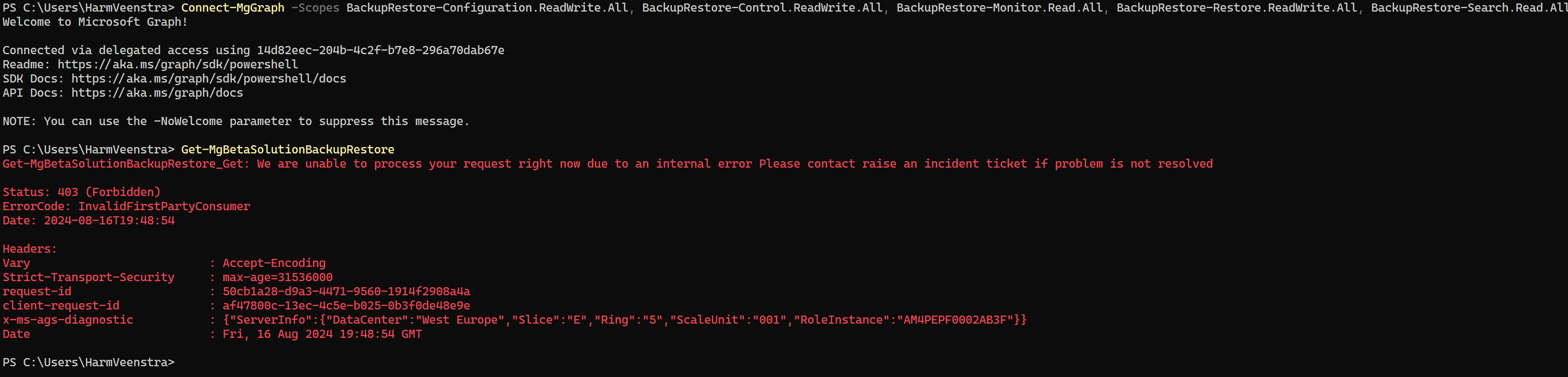
Gave myself ReadWrite.All permissions where I could (Not all scopes have ReadWrite.All) using:
Connect-MgGraph -Scopes BackupRestore-Configuration.ReadWrite.All, BackupRestore-Control.ReadWrite.All, BackupRestore-Restore.ReadWrite.All
But the same thing:
It was strange because the Microsoft Graph X-Ray output showed me it should be possible. The URLs from that output also didn’t work in Microsoft Graph Explorer.
Wrapping up
It’s a work in progress, I guess 🙂 I was happy I could finally use PowerShell for the Microsoft 365 Backup service, but it’s not yet ready. I will keep you posted. Enjoy your weekend!
Hi!
I am experiencing the same problem as you describe, whether I use the PowerShell module or go directly via Graph — it still ends with the error message “InvalidFirstPartyConsumer.”
Have you found any more information about the error?
/MR
No, didn’t find any information at that time and haven’t checked again. Perhaps we should create a Microsoft ticket?
Hi, is there an update on this?
I tried to use the MS Graph but I am receiving No Service App error even though I connected it to Azure App.
Tried it a while back, same… I will put on my ToDo again to check it