
It’s one of the Common Parameters, but not used that often 🙂 In this brief blog post, I will outline its advantages and explain why you should consider using it.
What are Common Parameters?
“The common parameters are a set of cmdlet parameters that you can use with any cmdlet. They’re implemented by PowerShell, not by the cmdlet developer, and they’re automatically available to any cmdlet.
You can use the common parameters with any cmdlet, but they might not have an effect on all cmdlets. For example, if a cmdlet doesn’t generate any verbose output, using the Verbose common parameter has no effect.
The common parameters are also available on advanced functions that use the CmdletBinding attribute or the Parameter attribute. When you use these attributes, PowerShell automatically adds the Common Parameters. You can’t create any parameters that use the same names as the Common Parameters.
Several common parameters override system defaults or preferences that you set using the PowerShell preference variables. Unlike the preference variables, the common parameters affect only the commands in which they’re used.
For more information, see about_Preference_Variables.
The following list displays the common parameters. Their aliases are listed in parentheses.
WarningVariable(wv)Debug(db)ErrorAction(ea)ErrorVariable(ev)InformationAction(infa)InformationVariable(iv)OutVariable(ov)OutBuffer(ob)PipelineVariable(pv)ProgressAction(proga)Verbose(vb)WarningAction(wa)”
What can you use the OutVariable Parameter for?
You can use it to save the output from Cmdlets while letting your Pipeline continue. This way, you will have the output saved in a Variable, which can be used to check or debug parts in your Pipeline command line.
Using OutVariable
In the example below, I will demonstrate how it works through two small examples. As used in many examples, I will use a Windows Process and a Windows Service example for that 🙂
Windows Process
In the example below, I query all the Processes named conhost and select the ones that are running as my current logged-in user. I used “-OutVariable processes” before the first Pipe statement to store all the conhost Processes in the $processes Variable.

Windows Services
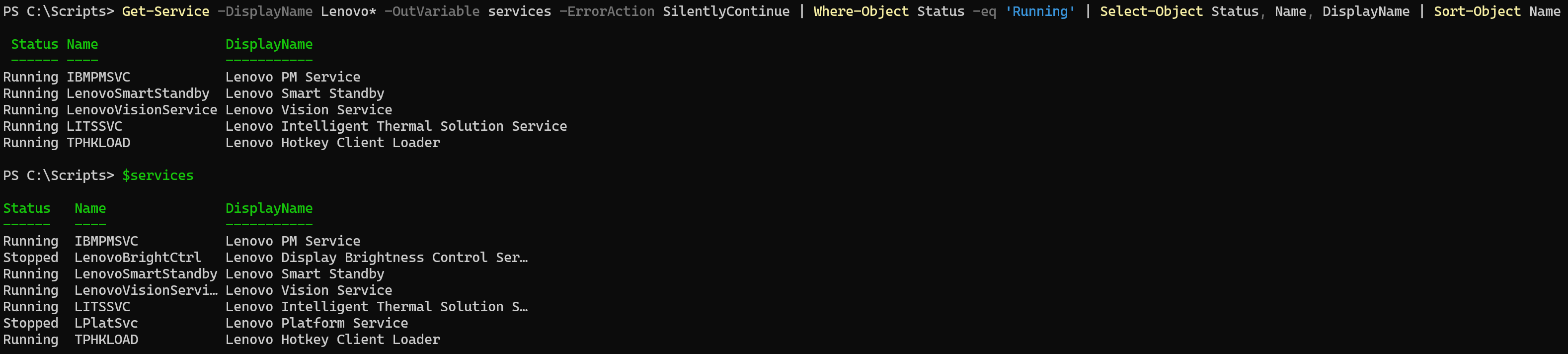
In this example, I query all services starting with “Lenovo” (yes, I’m a Lenovo fan 🙂 ) and select all those services with a Status of “Running“. I used “-OutVariable services” before the first Pipe statement to store all the Services in the $services Variable, regardless of the Status being Running or Stopped.
Wrapping up
And that’s how you can use the OutVariable Common Parameter to store information before using Where-Object and Select-Object, for example, to compare the filtered output with the initial output that you received from your first Cmdlet. Have a lovely weekend!