
If you don’t already know, there is a ‘Learning PowerShell’ section on Microsoft Learn. It’s truly a great start (or continuation) of your PowerShell journey. In this blog post, I will highlight the different chapters.
The ‘Learning PowerShell’ section
There is so much documentation on PowerShell on Microsoft Learn, but this section is a great place to start learning and exploring, with clear examples, how-tos, and explanations of concepts. You can find it here: https://learn.microsoft.com/en-us/powershell/scripting/learn/glossary?view=powershell-7.5 and expand the tree below ‘Learning PowerShell’
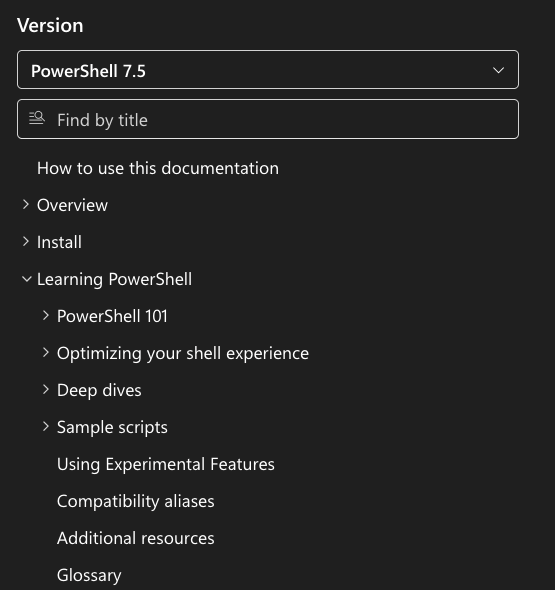
PowerShell 101
This part, starting here, contains 10 chapters based on the book PowerShell 101 by Mike F. Robbins. It will take you from starting Windows PowerShell (v5.1) to running your first Cmdlets, using the Help system, understanding how objects/properties/methods work, pipelines, Functions, Script modules, etc. It’s great for understanding the basic principles and concepts of the scripting language with examples, review questions, and references for even more information.
Optimizing your shell experience
This part, starting here, helps you optimize your shell usage with practical tips and tricks. Using tab-completion, how PSReadLine works, using help, aliases, customizing your Shell with colors, and formatting things. You will be in your Shell environment a long time, so it’s nice to have practical tips to make better use of your time there 🙂
Deep dives
This part, starting here, is a more in-depth chapter with examples, edge cases, and tips. The inaugural set of articles comes from @KevinMarquette and was originally published at PowerShellExplained.com. It takes you from Arrays, Hashtables, and PSCustomObjects to credential support in Functions, to things to avoid when assigning variables in expressions, and to limitations in PowerShell transcript usage. Great chapter to learn why some things just don’t work as you would expect, or to avoid using non-best practice stuff 😀
Sample scripts
This part, starting here, has a great set of examples for working with objects, managing computers/processes/services, working with output, managing your filesystem, and creating UI elements. (Some things only apply to Windows platforms; it will mention that in the top section of the articles if that’s the case)
Using Experimental Features in PowerShell
This part, starting here, starts with a red box telling you: Caution, Experimental features aren’t intended to be used in production since the changes are allowed to be breaking. And experimental features are things that the design hasn’t been finalized. And once it is, the design changes become breaking changes that will be highlighted in the release notes. The chapter will tell you how to enable or use them, as well as the PowerShell version in which that feature was added.
Compatibility aliases
This chapter, starting here, shows you available aliases (that you might not even be aware of, since they are in the format of normal Unix or Windows commands). But also that they might differ between Operating Systems, how parameters aliases and shorthand names work and… Most important… That you shouldn’t use Aliases in scripts! 😀 #BestPractice
Additional resources
This chapter, starting here, has links to the PowerShell training modules in Microsoft Learn, the PowerShell Team and Community blogs, and the Microsoft Virtual Academy. In addition to those great resources, the chapter also includes links to the PowerShell SDK and its API Browser.
PowerShell Glossary
The last chapter, starting here, includes a list of common terms and their details. Helpful because you can get a bit overwhelmed with all the terminology. 😉
Wrapping up
And that’s all the chapters in this nice resource on Microsoft Learn, a great place to start (or continue) on your PowerShell journey. Have a lovely weekend!
Hi Harm
My PowerShell journey started at Microsoft Learn/Technet.
There is so much great content in there to get you started. I have build on with a PowerShell course, but most of my experience and self study came from Microsoft Learn.
These days I use Copilot a lot, if i can’t remember the PowerShell syntax. It is fast and efficient. Copilot can give me the start for a script in just a couple of seconds and then I can build on from there.
Nice 👌 Not using Copilot myself, but I do understand it being great assistant
The PowerShell performance considerations are also a huge resource, given they state most of the techniques are not idiomatic but the performance gains are usually in the order of several magnitudes. Also binary powershell modules are a different beast all together. I remember using the DI binary powershell repo svrooji released and it is quite good.
Nice ❤️ Stephan is doing great stuff!