
You can add many licenses to your 365 tenant, but getting a good overview of all users’ assigned licenses and what each license plan contains is challenging. I wrote a PowerShell script for that, and it outputs all users and their assigned SKUs (Short for Stock-Keeping-Unit). In Microsoft terms, a license SKU predefines a license’s properties (Product/Version/Features) in a CSV file.
How does the script work?
The biggest problem was getting a good list of SKUs and the friendly names I could use, because… The standard output is something like this:
tenantname:DEFENDER_ENDPOINT_P1
tenantname:Win10_VDA_E3
tenantname:EMS
tenantname:SPE_E3
tenantname:POWER_BI_STANDARD
It gives you a hint, but you don’t know precisely what licensed features are available to the user. Luckily, Microsoft has a nice list on its website: https://docs.microsoft.com/en-us/azure/active-directory/enterprise-users/licensing-service-plan-reference. They also provide a CSV file there containing all the information I need for my script. Putting those things together resulted in the script below.
The script
To retrieve all details from the 365 tenant, you must install the MS Graph module. (https://learn.microsoft.com/en-us/powershell/microsoftgraph/installation?view=graph-powershell-1.0) You need to connect with an account with sufficient permissions. It will ask for Admin Consent if the MS Graph permissions are not already granted.
You can use the -FilterLicenseSKU to search for specific license SKUs or the -FilterServicePlan parameter to search for a particular ServicePlan. (You can only use one of the two License or Service filters; not specifying one gives you all the license details.) Also, you can filter results using -FilterUser to specify a part of the user or domain name to query for.
Note: Thanks for refactoring Baard Hermansen!
<#
    .SYNOPSIS
    Exports a per‑user Microsoft 365 license and service‑plan overview using Microsoft Graph.

    .DESCRIPTION
    Lists all licenses and service plans assigned to each user.
    Supports filtering by:
    - License SKU (friendly name)
    - Service plan name
    - User UPN
    If no -Filter* is used, all licenses will be reported.

    .PARAMETER FilterLicenseSKU
    The SKU of the license to search for (friendly name). If not used, all licenses will be reported.

    .PARAMETER FilterServicePlan
    The name of the service plan to search for (matches friendly OR internal name). If not used, all licenses will be reported.

    .PARAMETER FilterUser
    The username (UPN/userPrincipalName) of the user to search for. If not used, all users will be reported.

    .EXAMPLE
    .\Microsoft_365_License_Overview_per_user.ps1

    .EXAMPLE
    .\Microsoft_365_License_Overview_per_user.ps1 -FilterLicenseSKU 'Windows 10 Enterprise E3'

    .EXAMPLE
    .\Microsoft_365_License_Overview_per_user.ps1 -FilterServicePlan 'Universal Print'

    .EXAMPLE
    .\Microsoft_365_License_Overview_per_user.ps1 -FilterUser 'joe.smith'
#>

[CmdletBinding(DefaultParameterSetName = 'None')]
param (
    [Parameter(ParameterSetName = 'LicenseSKU')][string]$FilterLicenseSKU,
    [Parameter(ParameterSetName = 'ServicePlan')][string]$FilterServicePlan,
    [Parameter()][string]$FilterUser
)

try {
    # Load required Graph modules (install if missing)
    $required = @('Microsoft.Graph.Identity.DirectoryManagement', 'Microsoft.Graph.Users')
    foreach ($mod in $required) {
        if (-not (Get-Module -ListAvailable -Name $mod)) {
            Write-Verbose "Installing $mod module..."
            Install-Module $mod -Scope CurrentUser -Force -AllowClobber
        }
        Import-Module $mod -ErrorAction Stop
    }

    # Connect to Graph (reuse existing session if possible)
    if (-not (Get-MgContext)) {
        Connect-MgGraph -Scopes 'Directory.Read.All', 'User.Read.All', 'Organization.Read.All' -NoWelcome -ContextScope Process -ErrorAction Stop
    }

    # Download and cache the SKU reference CSV from Microsoft Docs, which contains mappings of SKUs and service plans to friendly names. This is needed because Graph returns only internal IDs for SKUs and service plans.
    Write-Verbose 'Downloading SKU reference CSV...'
    [string]$csvLink = (Invoke-WebRequest -DisableKeepAlive -Uri 'https://learn.microsoft.com/en-us/entra/identity/users/licensing-service-plan-reference' -UseBasicParsing).Links.href -match '\.csv$'
    $tempCsv = [IO.Path]::ChangeExtension((New-TemporaryFile).FullName, '.csv')
    Invoke-WebRequest -Uri $csvLink -OutFile $tempCsv -UseBasicParsing

    # Build lookup tables:
    #   SKU: String_Id (SkuPartNumber) -> Product_Display_Name (friendly SKU name)
    #   Service plan: Service_Plan_Id (GUID) -> full CSV row (for friendly + internal names)
    $skuLookup = @{}
    $planLookup = @{}

    Import-Csv -Path $tempCsv -Encoding Default | ForEach-Object {
        # SKU lookup (one entry per String_Id, last wins if duplicates)
        if ($_.String_Id -and $_.Product_Display_Name) {
            $skuLookup[$_.String_Id] = $_.Product_Display_Name
        }

        # Service plan lookup by Service_Plan_Id (this matches Graph ServicePlanId)
        if ($_.Service_Plan_Id) {
            $planLookup[$_.Service_Plan_Id] = $_
        }
    }

    Remove-Item $tempCsv -ErrorAction SilentlyContinue

    # Stream users from Graph
    Write-Verbose 'Fetching users from Graph…'
    $userQuery = @{
        All      = $true
        Property = @('id', 'userPrincipalName')
    }
    if ($FilterUser) {
        # Graph supports simple OData filter on UPN; adjust as needed
        $userQuery.Filter = "startswith(userPrincipalName,'$FilterUser')"
    }
    $users = Get-MgUser @userQuery

    # Prepare output file
    $outFile = [IO.Path]::ChangeExtension((New-TemporaryFile).FullName, '.csv')
    # Write header once to the outFile
    'User;LicenseSKU;ServiceplanFriendly;ServiceplanInternal;AppliesTo;ProvisioningStatus' | Out-File -FilePath $outFile -Encoding utf8

    # Process each user
    foreach ($user in $users) {
        Write-Verbose "Processing $($user.UserPrincipalName)..."
        $licenseDetails = Get-MgUserLicenseDetail -UserId $user.Id
        if (-not $licenseDetails) { continue }

        foreach ($detail in $licenseDetails) {
            # Resolve friendly SKU name from CSV, fall back to SkuPartNumber
            Clear-Variable skuName -ErrorAction SilentlyContinue
            $skuName = $skuLookup[$detail.SkuPartNumber]
            if (-not $skuName) { $skuName = $detail.SkuPartNumber }

            # Filter on SKU name if requested (friendly name)
            if ($FilterLicenseSKU -and $skuName -notmatch $FilterLicenseSKU) { continue }

            foreach ($plan in $detail.ServicePlans) {
                # Lookup service plan info
                $planInfo = $planLookup[$plan.ServicePlanId]

                # Extract friendly + internal names
                $friendlyPlanName = $null
                $internalPlanName = $null

                if ($planInfo) {
                    $friendlyPlanName = $planInfo.Service_Plans_Included_Friendly_Names
                    $internalPlanName = $planInfo.Service_Plan_Name
                }

                # Fallbacks if CSV is missing a row for this plan
                if (-not $friendlyPlanName) { $friendlyPlanName = $plan.ServicePlanName }
                if (-not $internalPlanName) { $internalPlanName = $plan.ServicePlanName }

                # Filter on ServicePlan name if requested
                if ($FilterServicePlan) {
                    if ($friendlyPlanName -notmatch $FilterServicePlan -and
                        $internalPlanName -notmatch $FilterServicePlan) {
                        continue
                    }
                }

                # Write output row
                $line = '{0};{1};{2};{3};{4};{5}' -f `
                    $user.UserPrincipalName,
                $skuName,
                $friendlyPlanName,
                $internalPlanName,
                $plan.AppliesTo,
                $plan.ProvisioningStatus

                $line | Out-File -FilePath $outFile -Append -Encoding utf8
            }
        }
    }

    # Summarize output
    $outputLength = (Get-Content $outFile).Count
    if ($outputLength -eq 1) {
        Write-Output "No matching licenses found."
        Remove-Item $outFile -ErrorAction SilentlyContinue | Out-Null
        exit 0
    }
    elseif ($outputLength -gt 1) {
        Write-Output "$($outputLength - 1) matching licenses found."
        # Open the CSV (optional – only if running interactively)
        if ($Host.UI.SupportsVirtualTerminal) {
            Invoke-Item $outFile
        }
        else {
            Write-Output "CSV written to $outFile"
        }
    }
}
catch {
    Write-Error $_.Exception.Message
    exit 1
}
finally {
    # Disconnect from Graph
    Disconnect-MgGraph | Out-Null
}
Script Output
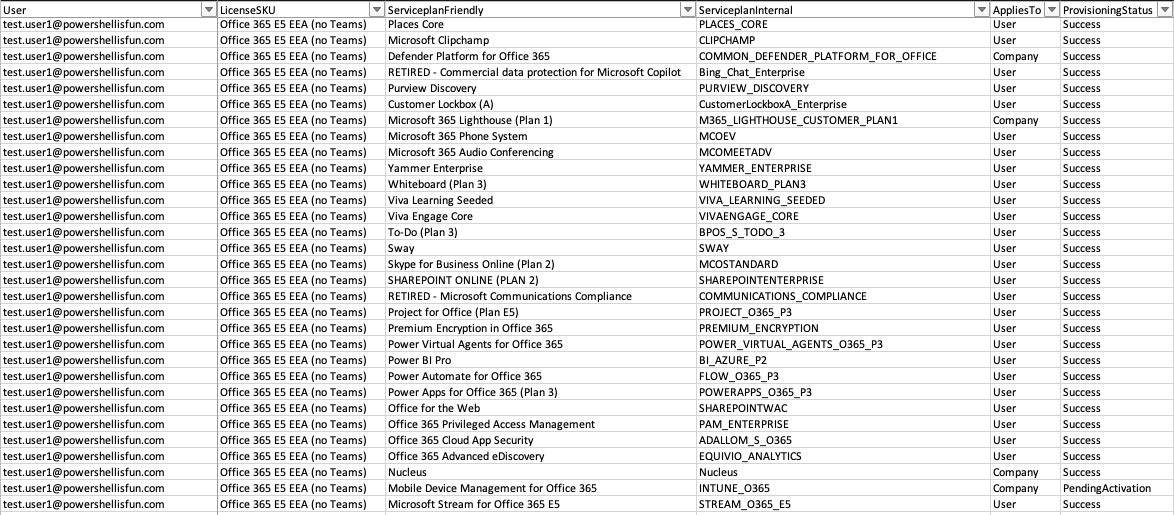
After running the script, it will automatically open a CSV file from your system’s temp location, and appear as shown in the screenshot below. For each user, it will output the LicenseSKU that includes the service plan. This way, you know which user has a specific license capability and which bundle it originates from. (Microsoft 365 E3, Windows 10/11 Enterprise, etc.) It also reports the provisioning status and whether the license applies to the user or company.
If you used one of the Filter parameters, the list will include only that filter. If the -Filter parameter returns no results, the script will display a warning after running. It will also display a warning if no licenses are found.
Download the script(s) from GitHub here
Thanks for the great script! for some reason when it tries to invoke the licensing.csv file it is hanging , I replaced this portion of the code with the actual CSV file which I downloaded from the https://docs.microsoft.com/en-us/azure/active-directory/enterprise-users/licensing-service-plan-reference page , however the end is result is a CSV file with one cell filled with some weird characters . any idea how to overcome this ?
this is the line of code I used to replace the Invoke Web Request portion :
$skucsv=$BasePath + “licensing.csv”
Where licensing.csv is the file I downloaded as I mentioned above.
Appreciate if you can shed some insights.
Had that issue before, invoke-webrequest without -UseBasicParsing can cause the script to hang.. And.. I rewrote it to use the new MS Graph module 🙂 Could you check if this works out for you, test in my CDX tenant worked fine
Great script. Works very well. Looking for a way to integrate the status of a serviceplan (Success, Disabled, Pednding) in the CSV-List. Any hint how to do this? Thanks!
Excellent addition! I added the AppliesTo (User or Company) and the Provisioning status to the script now 🙂 Also, an encoding issue resulted in a weird character with some license types. I fixed that too!
Thank you sooo much for your help. That’s exactly what I neeeded!
Thank you, no problem! Was a nice addition and glad to help 🙂
It’s a fantastic script that works well, but what if we only want to see users licensed with a specific product, like M365 E5?
The script works well, but how can it be modified to work for only a specific license, like M365 E5?
I updated the script with a -FilterServicePlan and a -FilterLicenseSKU parameter which you can use to search for specific ones
Is there a way to get license info from a specific file with users/upns of only users who want
I added a -FilterUser parameter, you can use that to specify a part of the user or Domain Name. For example, -FilterUser ‘Admin’ will output all users with Admin in their username. Specifying the Domain name, -FilterUser ‘@powershellisfun.com’, will also work.
Updated the blog post to reflect this extra parameter together with the script in the post and on GitHub
Thank you and will try and report back
Hello Harm
Great script which works as expected except it seems to not get all the serviceplans for the specific license i filtered against. The license in question has 33 serviceplans but it is only reporting back 13 in the csv for each user. Any ideas why that is happening?
But do you use license groups to allocate them? What are you filtering on?
‘.\Microsoft 365 License overview per user.ps1’ -FilterLicenseSKU ‘Microsoft 365 Business Basic’
That’s how i ran the cmd and no to license group assignment, we use scripts to assign when users are created.
I just tested it with a tenant with Business Premium and it returned 55 (49 in the plan were activated with group licensing. 6 were PendingProvisioning or PendingInput. I think that’s correct, the FilterLicenseSKU filter seems to work.
Is the total report, without filtering, correct?
HI Harm
So i hadn’t run it without the filter but have now and it seems (as not gone through with a fine-toothed comb) to be showing the other licenses we use with all serviceplans but for this specific plan “Microsoft 365 Business Basic” it does not contain all the serviceplans even in the total report. Very strange.
Could you share both versions with me without the user- and domainnames for me to see?