
It’s 2026, so it’s time to reflect on 2025 :). In this blog post, I will highlight the great PowerShell moments that happened this year.

- GitHub
- Microsoft MVP PowerShell
- Podcasts
- Top blog posts 2025
- 10 – Using the PowerShell WinGet module: 5,029 views
- 9 – Using Run-in-Sandbox for testing scripts and Intune packages: 5,266 views
- 8 – Upload Windows Autopilot hardware hash easily: 5,566 views
- 7 – Fixing Windows 11 24H2 – No Internet Access Issue using PowerShell and Intune Remediation: 5,571 views
- 6 – Create a TCP/UDP port listener using PowerShell: 5,632 views
- 5 – Adding printer drivers and printers using Microsoft Intune and PowerShell: 5,932 views
- 4 – Deploy and automatically update WinGet apps in Intune using PowerShell without Remediation or 3rd party tools: 7,481 views
- 3 – Microsoft Intune PowerShell Detection scripts: 11,923 views
- 2 – Keep Microsoft Teams status Available instead of away using PowerShell: 16,737 views
- 1 – Using the PowerShell PSWindowsUpdate module: 41,652 views
- Website stats
- Sponsor change
- Dutch PowerShell User Group
- Community
- Wrapping up
GitHub
My GitHub repository, https://github.com/HarmVeenstra/Powershellisfun, is still growing :). The number of stars and forks continues to rise; in 2024, it received 533 stars, 35 watchers, and 119 forks. But in 2025… Even more!

Microsoft MVP PowerShell
In March last year, I became a Microsoft MVP in PowerShell. In 2025, my membership was extended again for another year. (Read all about that here.)
Podcasts
In 2025, I was a guest on multiple podcasts:
- Cheers to 25 Years of Active Directory – A Happy Hour with Special Guest (February 17, 2025)
- VLOG Rene – Harm: Microsoft 365 Governance (March 19, 2025)
- Microsoft Cloud IT Pro Podcast – Episode 398 – PowerShell and Intune with Harm Veenstra (March 27, 2025)
- PSConfEU 2025 Bar Sessions: Community, Code & Connection. The PowerShell Podcast E183 (June 24th, 2025)
- Lightning demos at PSConfEU 2025 (June 25th, 2025)
- Virtual Dutch PowerShell User Group Meetup – Happy Holidays 2025 (December 3rd, 2025)
All of them were special, and I was proud to be on the Microsoft Cloud IT Pro Podcast after listening to it for so many years. (Met Ben and Scott at the MVP Summit, one thing led to the other 😉 PSConfEU with Andrew in Malmö was great fun, too! And my session at the Virtual DuPSUG event, despite some local networking issues, was a positive experience.
Top blog posts 2025
I wrote 52 blog posts again last year, but these are the top 10 of 2025:
10 – Using the PowerShell WinGet module: 5,029 views
Still one of my most-used modules when installing software on my local machines or using Intune and PowerShell scripts. The module is still in development, but it’s fully usable for production at this time.
Link: https://powershellisfun.com/2024/11/28/using-the-powershell-winget-module/
9 – Using Run-in-Sandbox for testing scripts and Intune packages: 5,266 views
It’s so convenient to be able to test things in an isolated manner, run-in-sandbox, from Damien Van Robaeys! I built some other things based on it, which you can find in the Windows Sandbox category on the right side of this website or by searching for it.
Link: https://powershellisfun.com/2023/04/03/using-run-in-sandbox-for-testing-scripts-and-intune-packages/
8 – Upload Windows Autopilot hardware hash easily: 5,566 views
One of my earlier blog posts explains how to upload hardware hashes to Intune using a PowerShell script, making it easier for your support department.
Link: https://powershellisfun.com/2022/07/09/upload-windows-autopilot-hardware-hash/
7 – Fixing Windows 11 24H2 – No Internet Access Issue using PowerShell and Intune Remediation: 5,571 views
Wrote this blog post because there were issues in 24H2 with Wi-Fi. Using Intune Remediation, you could deploy a remediation script to circumvent the issue.
6 – Create a TCP/UDP port listener using PowerShell: 5,632 views
One of the networking scripts I often use checks whether ports are open and whether firewalls in a customer environment are correctly configured for the necessary traffic. Wrote a blog post about using that together with the tools that you can use to test the port that you created a listener for.
Link: https://powershellisfun.com/2022/08/10/create-tcp-udp-port-listener-using-powershell/
5 – Adding printer drivers and printers using Microsoft Intune and PowerShell: 5,932 views
The pain of every admin: printers and their drivers :D. Wrote a blog post about that at the end of 2022, but it continues to get a lot of views, questions, and I regularly help people find the correct printer driver names for the scripts!
4 – Deploy and automatically update WinGet apps in Intune using PowerShell without Remediation or 3rd party tools: 7,481 views
This was the topic of a session I led at Workplace Ninjas NL, where I showed how to use the WinGet PowerShell module and Intune to deploy and update software on your devices. It wasn’t easy because the SYSTEM installation method didn’t work in PowerShell v5 but does in v7!
3 – Microsoft Intune PowerShell Detection scripts: 11,923 views
Wrote this in 2023, but continues to be a blog post that is viewed a lot. It explains how Detection scripts work with some examples.
Link: https://powershellisfun.com/2023/11/30/microsoft-intune-powershell-detection-scripts/
2 – Keep Microsoft Teams status Available instead of away using PowerShell: 16,737 views
I wrote a script, for fun, that would keep the Teams status set to Available instead of Away when your Teams client wasn’t running in the foreground. (Got the idea for writing it because my girlfriend was getting frustrated about Teams having an away status while she was working on that laptop)
1 – Using the PowerShell PSWindowsUpdate module: 41,652 views
And this, by far, is the most read blog post of 2025 🙂 It shows how to install and use the PSWindowsUpdate module, with examples of checking and installing updates, retrieving history, and installing or uninstalling specific updates.
Link: https://powershellisfun.com/2024/01/19/using-the-powershell-pswindowsupdate-module/
Website stats
I really love stats, and my WordPress stats for 2025 were almost similar to those of 2024!
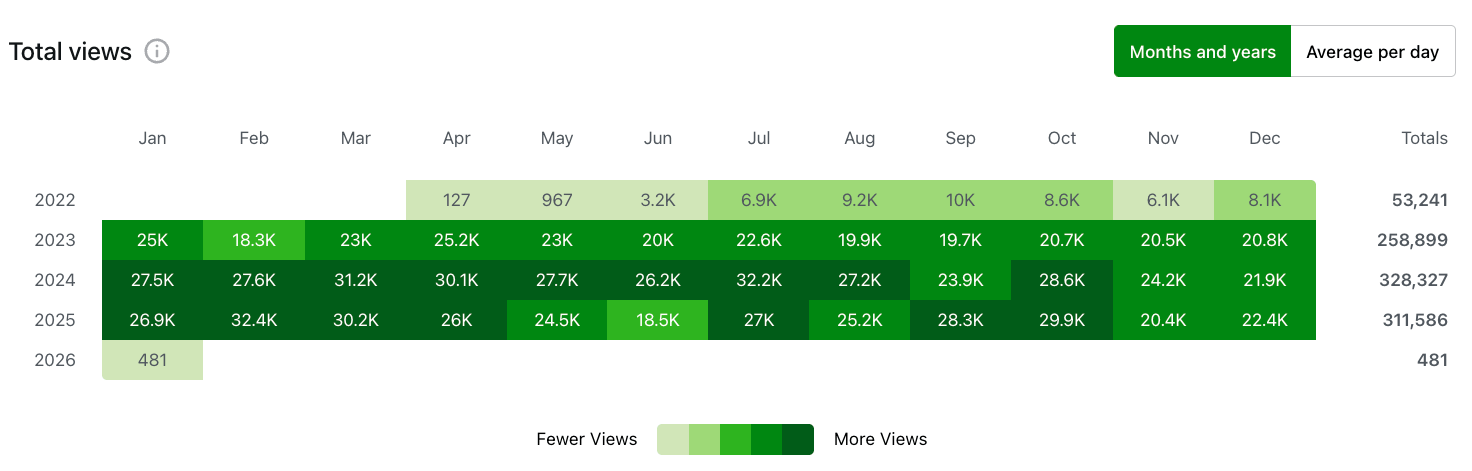
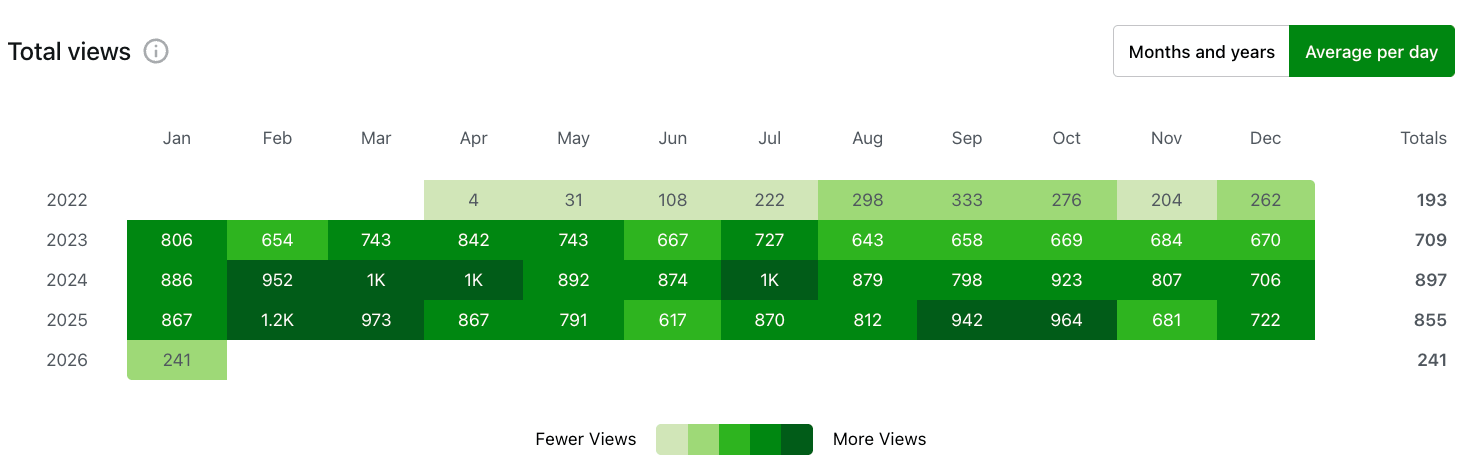
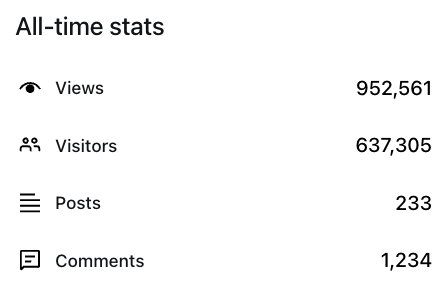
About 17K views less than 2024, however… There was a week that the stats were not reported due to Analytics issues (So, it’s actually closer), but I’m happy that it’s still constant 🙂 Last year, I was hoping to reach the million views mark, but it didn’t happen in 2025; it surely will in 2026!
Sponsor change
As mentioned in one of my last blogs, here, after almost 2,5 years of sponsorship from ScriptRunner, PDQ/The PowerShell Podcast will be my new sponsor! So happy with this, can’t thank Andrew Pla enough for this!
Dutch PowerShell User Group
2025 was the year of DuPSUG’s return! I attended one of their sessions and led one myself at their virtual event. And I’m proud to say Iam now a member of the DuPSUG crew. I’ve known the guys ( Jaap Brasser | LinkedIn, Leo Visser | LinkedIn, and Jeff Wouters | LinkedIn) for quite some time now, and it’s nice to be part of the Dutch PowerShell User Group, which hosts meetups and events for enthusiasts!
Community
And that’s what it’s all about: being part of a community like the PowerShell one, which is so rewarding! Countless messages, chats, and emails with people reaching out with questions or updates to previous projects with them… I love it! In 2025, there was no difference from previous years, and it will be the same in 2026. Welcoming, forgiving, and understanding bunch of “nerds” loving their PowerShell and helping each other out. Glad to be part of it!
Wrapping up
And that’s my 2025 overview of PowerShell is fun 🙂 It’s been a busy year, with many things happening, and I’m still growing, learning, and having fun. Have a lovely weekend!
Hi Harm
2025 was also the year where I discovered this great blog. It has been very interesting and inspicering to read your posts. Keep up the good work in 2026.
Thanks 😊 really appreciate it!