

I often forget that PowerShell can also do calculations in the Terminal, so I end up using my phone’s calculator again. In this small blog post, I will show you the options available for basic math and calculations.
Arithmetic Operators: What are those?
“Arithmetic operators calculate numeric values. You can use one or more arithmetic operators to add, subtract, multiply, and divide values, and to calculate the remainder (modulus) of a division operation.
The addition operator (+) and multiplication operator (*) also operate on strings, arrays, and hashtables. The addition operator concatenates the input. The multiplication operator returns multiple copies of the input. You can even mix object types in an arithmetic statement. The method that’s used to evaluate the statement is determined by the type of the leftmost object in the expression.
Beginning in PowerShell 2.0, all arithmetic operators work on 64-bit numbers”
Basic math
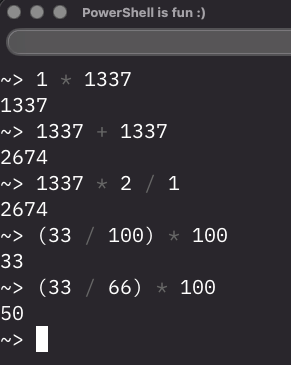
Sometimes you just need to do simple addition, subtraction, etc. For that, you don’t need to use your calculator app; you can just run it in the Terminal, even for percentages. For example:
Operator Precedence
PowerShell processes arithmetic operators in the following order:
| Precedence | Operator | Description |
|---|---|---|
| 1 | () | Parentheses |
| 2 | - | For a negative number or unary operator |
| 3 | *, /, % | For multiplication and division |
| 4 | +, - | For addition and subtraction |
| 5 | -band, -bnot | For bitwise operations |
| 5 | -bor, -bxor | For bitwise operations |
| 5 | -shr, -shl | For bitwise operations |
PowerShell processes the expressions from left to right according to the precedence rules. The following examples show the effect of the precedence rules:
3+6/3*4    # result = 11
3+6/(3*4)  # result = 3.5
(3+6)/3*4  # result = 12
Filesizes
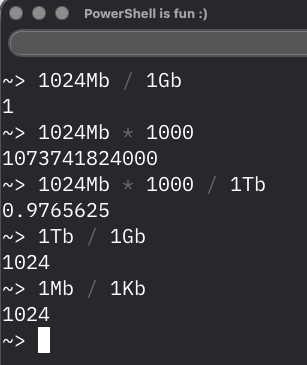
You can also calculate back and forth from Megabytes to Gigabytes to Terabytes and back, for example:
Dates
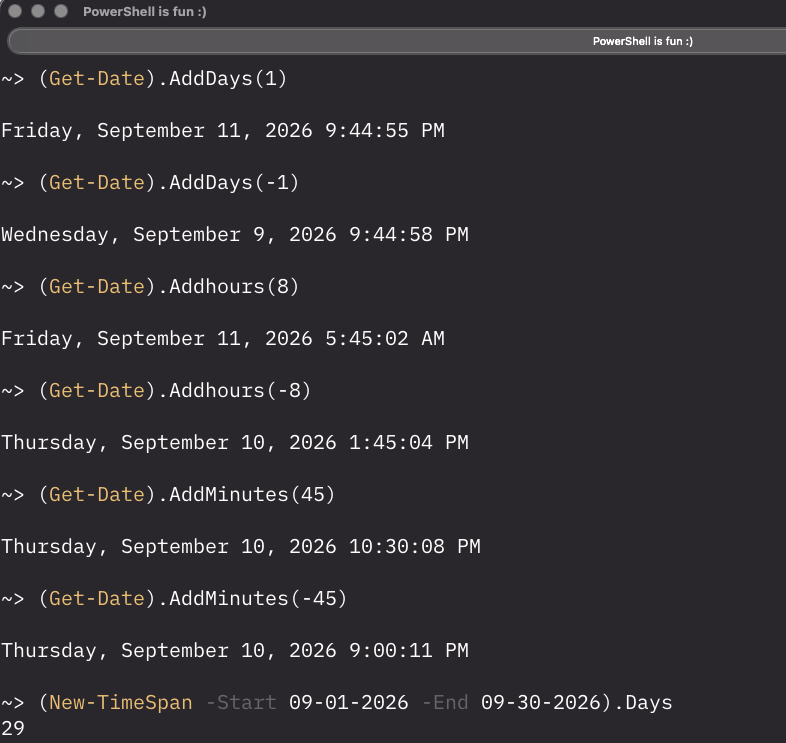
You can use Get-Date and New-Timespan to calculate remaining days, hours, minutes back and forth, or between two specific dates. For example:
More information
There are a lot more things you can do with numbers and dates, as well as bitwise operations. The Microsoft Learn link from the first chapter above has guidance on that and also how to avoid precision loss from type conversions.
Wrapping up and Workplace Ninjas Summit
And that’s how you can calculate things in your Terminal when needed 🙂 Have a lovely weekend. Next week I will do a write-up of my Workplace Ninja Summit event in Switzerland, where I will do a session together with David Segura about what’s new in OSDCloud Community Edition!